


 FREE Delivery over £35
 Unbeatable Prices
Reviewed on: October 3, 2022
Great product
Does what it says. I would only ever use branded products to maintain the printers warranty and use.
- Would Recommend:
Order now for dispatch tomorrow
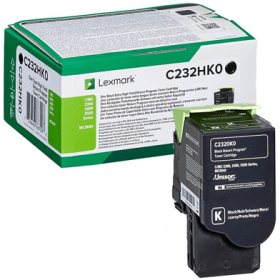
Black
Number in Pack: 1
ISO Page Life: 3000 pages each (5% coverage)
MPN: C232HK0
Original Lexmark C232HK0
In the unlikely event that you do find a product at a lower price through a UK-based retailer, we will refund 110% of the difference up to 7 days after your purchase.
For more information, click here
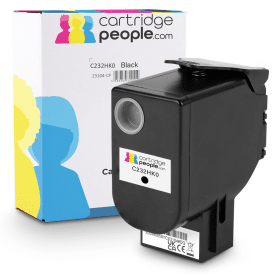

Black
Number in Pack: 1
ISO Page Life: 3000 pages each (5% coverage)
MPN: C232HK0
The Lexmark C232HK0 black toner cartridge is designed for high-volume printing, offering exceptional performance and reliability. Engineered for professional environments, this cartridge delivers crisp text and vibrant images. It is also high capacity, so you won't have to replace it as often as the standard capacity alternative. This toner also uses Lexmark's Unison Toner formulation to ensure images and text have outstanding quality and promote greater sustainability.
Features:
Cartridge People Recommendation
We always recommend using our Own Brand Toner Cartridges wherever they're available.
No results found. Please try a less specific term, or empty this field to reveal all categories.

Black
Number in Pack: 1
ISO Page Life: 6000 pages each (5% coverage)
MPN: C242XK0
Cyan
Number in Pack: 1
ISO Page Life: 3500 pages each (5% coverage)
MPN: C242XC0
Magenta
Number in Pack: 1
ISO Page Life: 3500 pages each (5% coverage)
MPN: C242XM0
Yellow
Number in Pack: 1
ISO Page Life: 3500 pages each (5% coverage)
MPN: C242XY0

Black
Number in Pack: 1
ISO Page Life: 3000 pages each (5% coverage)
MPN: C232HK0
Cyan
Number in Pack: 1
ISO Page Life: 2300 pages each (5% coverage)
MPN: C232HC0
Magenta
Number in Pack: 1
ISO Page Life: 2300 pages each (5% coverage)
MPN: C232HM0
Yellow
Number in Pack: 1
ISO Page Life: 2300 pages each (5% coverage)
MPN: C232HY0

Black
Number in Pack: 1
ISO Page Life: 1000 pages each (5% coverage)
MPN: C2320K0
Cyan
Number in Pack: 1
ISO Page Life: 1000 pages each (5% coverage)
MPN: C2320C0
Magenta
Number in Pack: 1
ISO Page Life: 1000 pages each (5% coverage)
MPN: C2320M0
Yellow
Number in Pack: 1
ISO Page Life: 1000 pages each (5% coverage)
MPN: C2320Y0

Black
Number in Pack: 1
ISO Page Life: 6000 pages each (5% coverage)
MPN: C242XK0

Black
Number in Pack: 1
ISO Page Life: 1000 pages each (5% coverage)
MPN: C2320K0

Cyan
Number in Pack: 1
ISO Page Life: 3500 pages each (5% coverage)
MPN: C242XC0

Cyan
Number in Pack: 1
ISO Page Life: 2300 pages each (5% coverage)
MPN: C232HC0

Cyan
Number in Pack: 1
ISO Page Life: 1000 pages each (5% coverage)
MPN: C2320C0

Magenta
Number in Pack: 1
ISO Page Life: 3500 pages each (5% coverage)
MPN: C242XM0

Magenta
Number in Pack: 1
ISO Page Life: 2300 pages each (5% coverage)
MPN: C232HM0

Magenta
Number in Pack: 1
ISO Page Life: 1000 pages each (5% coverage)
MPN: C2320M0

Yellow
Number in Pack: 1
ISO Page Life: 3500 pages each (5% coverage)
MPN: C242XY0

Yellow
Number in Pack: 1
ISO Page Life: 2300 pages each (5% coverage)
MPN: C232HY0

Yellow
Number in Pack: 1
ISO Page Life: 1000 pages each (5% coverage)
MPN: C2320Y0
Thank you for your review.
Page life provided for an ink cartridge is based on lab tests done following ISO standards. When these test are performed the same page is printed continuously on standard settings using standard A4 paper, unless it is specifically a photo cartridge where they may use alternative settings. Keep in mind, there are countless variables when using at home, including, but not limited to, cleanings, printer clean cycles, saturation, etc.The tests are based on 5% coverage of an A4 page.When you print at home you may print full letters, images, photos, therefore printing pages that cover 25%, 50% up to 100% of the page will drastically decrease this provided page yield.Page Life Examples: 5% Page Coverage for Ink and Toner Explained | Page Yield Information (cartridgepeople.com)Recommend tips for extending your cartridge life:Change your print settings: One of the easiest ways to extend the life of your ink cartridges is to switch your print settings. Most printers offer several levels of print quality ranging from fine to normal to fast normal. Changing to Draft or Fast Normal and from colour to grayscale (aka black and white) will create a legible document while using less ink. Just go to Properties or Preferences, depending on your printer, in the print menu and make the switch.Take advantage of print preview: Viewing your documents in Print Preview gives you the chance to check your work on-screen and make any changes before sending it to print. Saving documents electronically, such as a PDF (portable document format), will make for ink-less distribution.Disregard the low ink warning:Don't hurry to change your ink cartridge at the first sign of the low ink warning. Though that is not to say you shouldn't have a new cartridge on hand. Instead we suggest keeping an eye on your prints, wait until the quality of output begins to diminish, this is ideal time to change over. WARNING - NEVER let a cartridge run dry.Keep the nozzles clean: If you see white, faint or broken lines in your document chances are the print nozzles are clogged. Most printers have built in maintenance programs which are designed to fix quality issues, look for printhead clean/deep clean/nozzle clean. Also when using a new cartridge run the Alignment program too to ensure cartridges are correctly loaded. If the built in programs do not work you can attempt to manually unclog them by soaking the nozzles in warm water until the dried ink starts running again. Leave the cartridge in a small amount of water (just enough to cover the printhead) for several minutes before removing and gently wiping dry with a lint free soft cloth or good quality kitchen towel. Reinstall the cartridge and run your machines print-head cleaning program once more.Use different fonts: Opt for smaller font sizes in your documents while avoiding typefaces with thick lettering. Fonts such as Arial and Times Roman use less ink.Adjust your resolution and image size: Resolution is the number of dots per inch (dpi) in a graphic, or photograph. The greater the dpi, the larger the file size and the more ink it takes to print. So how do you know what resolution to use? In most cases 72 dpi is sufficient for an inkjet or laser printer. Depending on the image and its intended purpose you could go as high as 200 or 300 dpi. If you are printing from a word processing program choosing Draft or Fast Normal in the Print Properties or Preferences menu is roughly equivalent to 72 dpi. If you are printing directly from a photo editing program such as Photoshop, you can change the resolution and the image size from the Image menu.Protect your cartridges: If your printer won't be used for a while, put the cartridges in a plastic, sealable bag so the ink won't dry up. Please handle the cartridges carefully, covering skin, clothing and surfaces when handling any ink cartridge.I hope this has answered your query and has provided you with tips you can apply in your future printing.
Kind Regards
Marianne
Responded on: May 7, 2022
Lowest Price GuaranteeIn the unlikely event that you do find a product at a lower price through a UK-based retailer, we will refund 110% of the difference up to 7 days after your purchase.