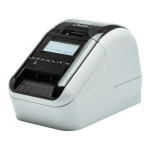


Use the Brother P-Touch QL820NWB to print custom sized labels from a PC, smartphone or tablet using a variety of connectivity options.
You can print via a USB, through an Ethernet or Wi-Fi connection or even through AirPrint if you have an iPhone or iPad device. By downloading the P-Touch Editor design software for free, you can quickly and easily create and print labels from your mobile phone showing barcodes, images and frames.
Classed as a traditional label printer, the Brother P-Touch QL820NWB can be used to identify items in your office and keep your workstation organised. Design your labels on a PC and upload them to internal memory locations. From there, scroll through your stored labels and choose the one you need using the backlit graphic display.
Keep your Brother P-Touch QL820NWB performing to a high standard by choosing from the range of consumables available on this page from Cartridge People.


 FREE Delivery over £35
 Unbeatable Prices
