


 FREE Delivery over £35
 Unbeatable Prices
Printer Testing – Print Test Page
Print a test page to test your printer’s performance. By doing so, you can analyse your printer’s performance and calibrate it effectively. It will help you to check the print quality of your printer (and cartridges) and will highlight any issues that your printer device may be having.
There are two types of printer test pages available to download from Cartridge People below, with a step-by-step guide. A colour test page and a greyscale test page.
How to Print a Test Page From Your Computer
If you’re looking to print a basic printer test page, simply follow the procedure below:
- Click on the Windows start button.
- Select control panel (or type “control panel” in the search bar).
- Click “View devices and printers”.
- Use the mouse and right click on the icon for your printer.
- Select “Printer Properties”.
- Click “Print Test Page”.
- A printer test page will now be sent to your printer. Once your test page has printed, click “OK” to close the pop-up window.
Cartridge People’s Printer Test Pages
Printer Colour Test Pages
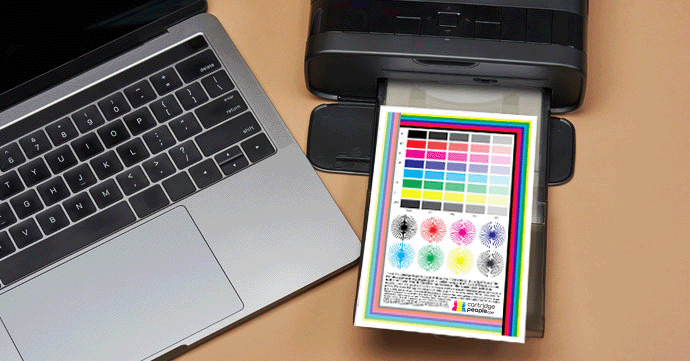
This downloadable PDF colour test page will allow you to check the colour print quality of your printer. We recommend that you print this page on at least 80gsm paper in normal quality and at full size (100%).
The PDF below is to be used for testing printers that use four or more colours. The test page shows a colour intensities graph, rainbow bars, radial gradients and a text block.
Download Our Colour Printer Test PagePrinter Greyscale Test Page
This downloadable PDF greyscale test page is best for testing the abilities of your black ink cartridge. As with the colour printer test page, it includes an intensities graph, radial gradients and a text block with descending sizes. This demonstrates current printer settings and scaling.
Also shown is a grid, which helps the printhead align and ensures that the printhead is providing accurate printouts.
Download Our Greyscale Printer Test PageOur printing test pages should provide you with a robust and well-rounded printer analysis. A print quality problem can have several causes, if you look at our FAQs, you will find some possible causes and solutions. Alternatively, you can contact our Customer Service team.
Common Printer Errors
A printer test page can be used to identify issues such as:
Blocked printheads
These can become blocked for a number of reasons, but the most common is that the ink cartridge and the printer head has dried out. This can be quite common if you don’t use your printer often. We recommend covering your printer when it is not in use to keep it free from dirt and debris. This will help stop the printer heads from becoming clogged.
Alignment issues
No matter what printer you have, be it an HP printer or a Brother printer, alignment might fail due to cartridges sitting unevenly. If your printer fails to line up your printed pages properly or you get the “alignment failed” error message, then that is an indication of this.
Inconsistent ink flow
If your inkjet printer has gone unused for a long period of time, the printheads may have become blocked or the ink in and around the printer cartridge may have dried out to cause inconsistent ink flow. Our colour test page will help you check the quality of your printer ink to ensure that the ink is flowing into your printer without issue.
Printer status
If your printer is printing test pages with no issues, but not printing any other documents, then you can confirm that the cause is a system communication issue rather than a mechanical printer issue.
Is the Print Quality Not to Your Liking?
It is possible that the printer cartridge needs to be replaced. This can differ per printer. If this is not the case and the print quality is still bad, please send a scan or photo of your printed colour test page to our Customer Service team. They will then be able to assess the print quality and best advise you on how to fix the potential problem.
In order to maintain optimal print quality, regular maintenance is required. Use printer maintenance kits and printhead cleaning cartridges to keep your printer in the best condition. For comprehensive guidance on printer upkeep, please see our articles on how to carry out printer maintenance and how to fix common printer problems.
Printing Solutions from Cartridge People
For your printing needs, choose Cartridge People. We have a wide variety of ink and toner cartridges in stock, from commonly used cartridges like the HP 305 to rarer models. As well as this range of cartridges, we also have a wide variety of printers in stock.
Browse our range of printing solutions today.
About The Author
