


 FREE Delivery over £35
 Unbeatable Prices
RGB or CMYK for Printing Photos? How to Get Optimal Print Results
Have you ever printed a photo and noticed the quality and accuracy of the print doesn’t match what’s on your computer? We have some handy information and tips, and an infographic to show you everything you need to know about how to get the most out of your photo printing.
What is RGB and CMYK?
Choosing the right colour model is really important – it will affect how your image looks in different formats. It’s important to know which colour model is the best fit for the outcome you want.
What you need to know about colour models:
- RGB (Red, Green and Blue) is best for digital displays, such as computer monitors, smartphones and TV’s.
- RGB has a wider range of colours, which is why images can look more vibrant on-screen.
- CMYK (Cyan, Magenta, Yellow and Black) is the colour model used by printers to translate your print to the page.
- CMYK has a narrower range of colours, which is why some images don’t look as vibrant when printed out.
- You can convert your image to the CMYK colour model before printing to give you a more accurate representation of what it will look like when printing!
- Read our infographic below for more details about how RGB and CMYK models work and how to choose which is right for you.
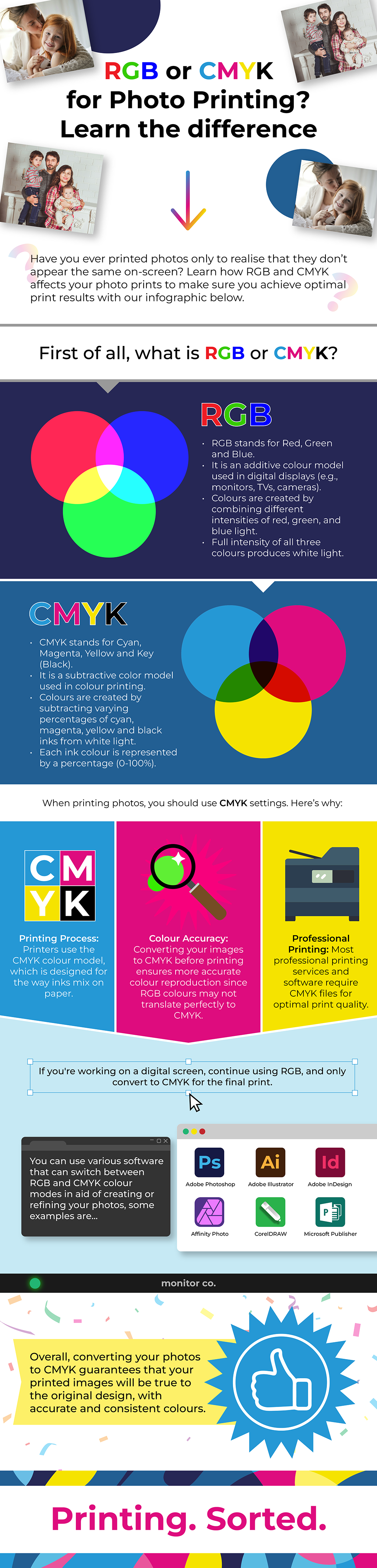
If you would like to add our infographic to your website you can copy and paste this embed code provided below:
Our Top Tips
Converting your images from RGB to CMYK before printing allows you to see a better representation of how your images will look printed out – but seeing the colours printed out can really change the perspective of your image. Download and print our colour wheel chart to accurately see how your printer is going to print each colour.
To get the best prints, use good quality products. Our Own Brand photo paper is available in a variety of finishes, including matte, glossy and semi-gloss. When paired with Cartridge People Compatible Own Brand ink and toner. the results are sure to be vibrant and clear.
Learn more about the ins and outs of design and printing with our Printing Glossary – where we explain what different technical terms mean to help you get the most out of your printing.
Understanding the differences between RGB and CMYK colour models, and being able to apply the correct one, will help improve the quality of your images whether on-screen or printed out. Convert your images early in the process, use high-quality materials and check your printer settings before printing out to make sure your photos look as vibrant and accurate as the original. Check out our infographic for more information on RGB and CMYK for photos.
Your Office. Your Peace of Mind
At Cartridge People, we know that organising and filling an office with everything you need is difficult. That’s why we’ve put together a great range of printer ink & toner and inexpensive office supplies. We have a full range, including Epson printer cartridges, toners for xerox printers and Canon printer inks.
About The Author
