


 FREE Delivery over £35
 Unbeatable Prices
Best Ink Tank Printer 2025
Our helpful buyer’s guide not only provides expert recommendations for a wide range of use cases (see the list below) but also advice on what you should consider when buying an ink tank printer.
What is an Ink Tank? How is it Different to an Inkjet?
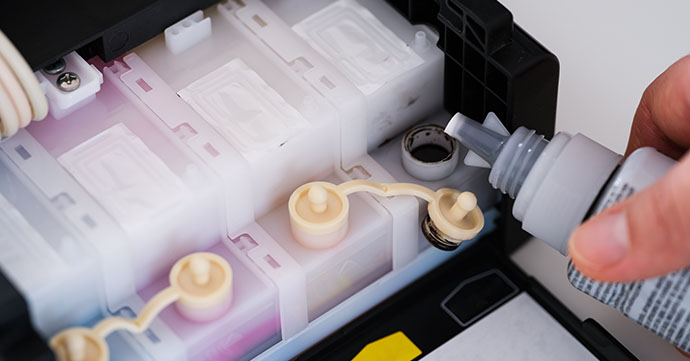
An ink tank printer doesn’t use any cartridges and instead utilises ink bottles which are used to top up the ink container within the printer. An ink tank is a specific type of inkjet printer. While ink tanks can be replaced, ink bottles are used to top up the printhead that’s already in the device. These printheads can’t be removed, only topped up using ink bottles.
What Are the Disadvantages of an Ink Tank Printer?
Ink Drying Out: Printer ink can dry out if not used frequently enough. This can then cause the ink to evaporate or the printhead to clog. The inconvenience of this when you just want to print can’t be understated.
Not Suitable for Infrequent Use: If you’re not printing in high volumes, we can’t say that you’ll find an ink tank is worth the price. In fact, you may find yourself wasting ink (and therefore money) on cleaning cycles or fixing clogs. This of course defeats the purpose of buying an ink tank to save on your printing costs.
Higher Cost Upfront: Compared to traditional inkjet printers, the device's price point is higher, which may put off some potential buyers. They’re built for longevity, supporting high-volume printing and also include more ink right away, moving the price largely from recurring cartridge spend to the initial purchase.
Messy Refills: There’s undoubtedly a higher potential for mess with ink tank printers. This is because the process involves handling liquid ink that could potentially drip, spill or even smudge. Cartridges on the other hand, are sealed and pre-filled units that click into place without you having to directly handle the ink.
Not Compact: The integrated ink tanks mean the printer is often not as compact as an inkjet, meaning it takes up more space where it may be at a premium, such as in a home or small office. They’re less flexible in terms of the location of the printer.
Alternatives to an Ink Tank
If you’ve decided after reading this that an ink tank isn’t suitable for your printing habits, please see our recommended alternatives below, chosen to allow you to take advantage of the benefits of an ink tank, while avoiding the disadvantages listed above:
Budget Home Printer for Cheap Ink
Canon PIXMA TS3350
If you want to save both on the printer itself and the ink cartridges, we think you should take a look at the Canon PIXMA TS3350. This compact printer is a great option for those who want to print at home infrequently. Wireless connectivity is easy to set up on the Canon TS3350 and it even features a 1.5in mono LCD for intuitive operation. Additionally, print quality isn’t compromised with the lower price tag, as this Canon device boasts a resolution of up to 4,800 x 1,200 dpi. The PIXMA TS3350 is the perfect printer for budget-conscious families.
Duplex Printer for More Sustainable Printing
Duplex printing is the process of printing on both sides of the page. This obviously offers a massive environmental and monetary benefit to you. Some printers also support auto duplex printing, where the machine turns the page over for you, for added convenience.
We recommend the Brother MFC-L8690CDW if you want automatic duplexing support. The MFC-L8690CDW is also energy efficient and complies with a range of environmental standards, including Nordic Swan and German Blue Angel.
Low Cost Per Page
This printer accepts individual ink cartridges, which save you money thanks to their low cost and impressive page yields of up to 350 pages, which are more than suitable for the typical home printer. It also supports auto duplex printing for more eco-friendly print jobs.
Less Frequent Top-Ups
If you want a printer that supports infrequent ink replacement, we’d suggest you check out the Brother MFC-J5740DW. The LC422 ink cartridges it accepts can print 550 pages for the standard capacity and 3,000 (black) and 1,500 (cyan/magenta/yellow) pages respectively for the high capacity versions. This ensures printer ink top-ups are only necessary on an occasional basis.
Printing Photos
Epson Expression Photo XP-8700
If printing photos is a priority for you, we would recommend the Epson Expression Photo XP-8700. With 6-colour Claria Photo HD individual inks, it produces prints with accurate colours. It also has an impressive print resolution of 5,760 x 1,440 dpi for detailed prints.
Occasional Home Printing
A budget-friendly printer that’s ideal for household use, the Epson Expression Home XP-4200 makes the printing process more intuitive. For example, you can print and copy directly from the 6.1cm LCD. Printing tasks are quick and simple thanks to print speeds of up to 33ppm (mono) and 15ppm (colour).
Still Want an Ink Tank Despite the Drawbacks?
Despite the above, if you are still interested in buying an ink tank, you can find our recommendations for the best ink tank printers below.
Expert Recommendations
You can trust us to provide useful recommendations tailored to your needs, whether you’re looking for a budget option or an ink tank for your workplace. We’ve been helping our customers find the right products since 2001 and stock a wide range of printers for both home and business users.
List of Categories
- Best Overall Ink Tank Printer
- Best Affordable Ink Tank Printer
- Best All-In-One Ink Tank Printer
- Best Office Ink Tank Printer
- Best Small Office / Home Office Ink Tank
- Best Ink Tank Printer for Home Use
- Best Wireless Ink Tank Printer
- Best Eco-Friendly Ink Tank Printer
- Best Wide-Format Ink Tank Printer
- Best Ink Tank Photo Printer
Best Overall Ink Tank Printer
Canon MAXIFY GX6050
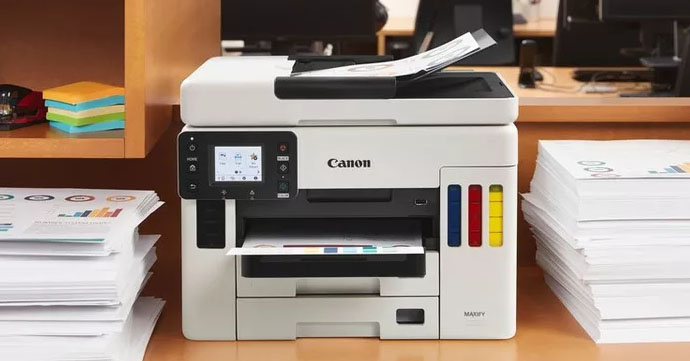
Productivity focused ink tank that prioritises professional prints.
Functionality: Print, scan, copy
Print Speed: 24ipm (mono) / 15.5ipm (colour)
Paper Capacity: Cassette = 250 sheets / rear tray = 100 sheets
Connectivity: USB, wireless, Wi-Fi, ethernet, cloud
Ideal User: Businesses
Pros:
- MFP
- 50 sheet ADF
- Banners up to 1.2m long
- 6.9cm colour touchscreen
Cons:
- No faxing
The Canon MAXIFY GX6050 is our choice of the best overall ink tank printer because it doesn’t sacrifice productivity for the sake of eco-friendliness, proving you can print in high volumes and still do your bit for the planet.
Ink bottles for the GX6050 not only cut down on waste but also feature high yields, improving the efficiency of your printing. Featuring a small footprint that’s great for printing in areas where space is at a premium, this Canon MFP is ideal for a wide range of businesses and institutions. Capable of printing banners up to 1.2m in length, create impressive promotional materials with the Canon GX6050. This refillable ink tank includes a 6.9cm colour touchscreen, for greater ease of use, as well as a 50 sheet ADF to improve your efficiency.
Combining fast print speeds (of up to 24ipm) with a paper capacity of up to 350 sheets, the Canon MAXIFY GX6050 is a productive printer and, in our opinion, the best ink tank printer currently on the market.
Shop the Canon MAXIFY GX6050

Best Affordable Ink Tank Printer
HP Smart Tank 5105
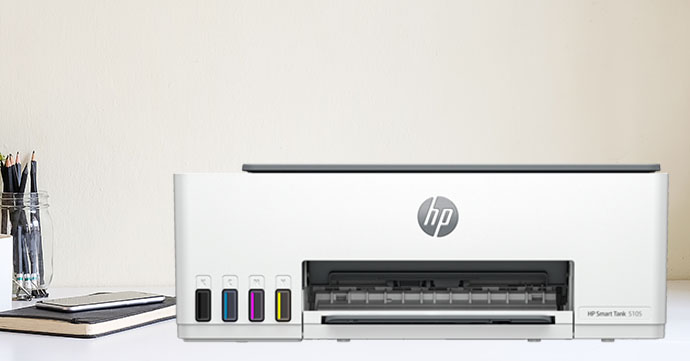
Low-price, flexible ink tank which can produce great prints.
Functionality: Print, scan, copy
Print Speed: Up to 22ppm (mono) / 16ppm (colour)
Paper Capacity: 100 sheets
Connectivity: Wi-Fi, Wi-Fi Direct, USB
Ideal User: Home users
Pros:
- Affordable ink tank
- MFP
- Connectivity options
- Great print quality
Cons:
- No faxing
A great option for those needing an ink tank on a budget, the HP Smart Tank 5105 is versatile and doesn’t compromise on performance despite its lower price point.
Capable of printing, scanning and copying, the HP 5105 allows you to carry out a wider range of tasks in a home office, for example. Additionally, a paper capacity of 100 sheets will help to keep you printing for a reasonable amount of time before having to top up. While it can’t fax, this shouldn’t be an issue for the typical home user. Wi-Fi connectivity makes printing on this HP ink tank even more convenient, with Wi-Fi Direct support allowing you to print without needing a network. Additionally, USB connectivity is available for those who require a wired connection.
Experience high-quality printing (4,800 x 1,200 dpi) for less with the HP Smart Tank 5105, our top budget ink tank printer.
Shop the HP Smart Tank 5105

Best All-In-One Ink Tank Printer
Epson EcoTank ET-8500
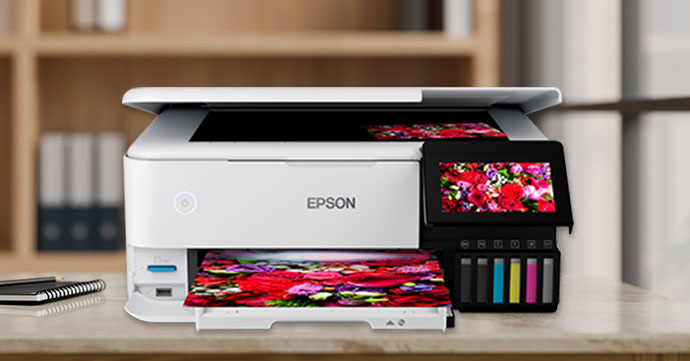
A versatile ink tank that can produce visually impressive prints.
Functionality: Print, copy, scan
Print Speed: Up to 32ppm (mono/colour)
Paper Capacity: 3 paper trays
Connectivity: Ethernet, USB, wireless, Wi-Fi Direct
Ideal User: Photo printers
Pros:
- High print resolution (5,760 x 1,440 dpi)
- Wi-Fi Direct
- Multiple paper trays
- 10.9cm colour touchscreen
Cons:
- No fax
With print, copy and scan functionality, the Epson EcoTank ET-8500 allows you to carry out a wider range of tasks than a print-only machine. You can also make use of some of the printer’s additional functionality via the Epson Smart Panel app, as it allows you to copy documents, as well as print your photos.
Produce impressive colour prints with the Epson ET-8500. 6-colour Epson Claria ET premium ink helps to print professional quality photos. With a print resolution of 5,760 x 1,440 dpi, vibrant colour prints are assured.
The 10.9cm colour touchscreen can be used to print directly from your USB flash drive or SD card, for more streamlined printing. Finally, the addition of three paper trays gives you more flexibility in terms of paper storage.
Expand the range of tasks your ink tank can carry out, while producing prints of a high standard with the Epson EcoTank ET-8500.
Shop the Epson EcoTank ET-8500

Best Office Ink Tank Printer
Canon MAXIFY GX7050
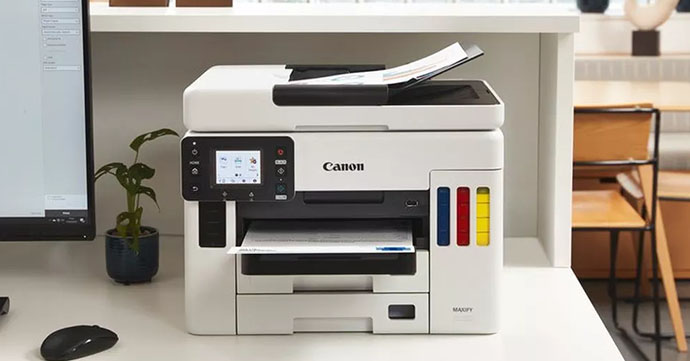
Get more done for your business with this AIO.
Functionality: Print, scan, copy, fax
Print Speed: Around 24ipm (mono) / 15.5ipm (colour)
Paper Capacity: Rear tray = 100 sheets / 2 x 250 sheet cassettes
Connectivity: Ethernet, USB, Wi-Fi
Ideal User: Businesses
Pros:
- AIO
- Wireless printing
- Auto duplex printing
- High paper capacity
- Touchscreen
Cons:
- Colour print speed could be faster
Designed to support the smooth running of a busy workplace, the Canon MAXIFY GX7050 has to be our pick of the best ink tank for offices. While it’s a smaller printer, it doesn’t compromise on its functionality, with lots of features to help your office print efficiently.
Featuring a tiltable 6.9cm colour touchscreen, carrying out your business’s printing tasks is intuitive. Auto duplex print support also allows you to cut down your paper usage by 50%, saving you money and time, while also being better for the environment. Minimise trips to the printer to top up your copy paper thanks to the addition of a rear tray capacity of 100 sheets, as well as two 250 sheet cassettes. Helping you and your colleagues to streamline the printing process, connectivity options allow you to remotely print, scan and copy.
Shop the Canon MAXIFY GX7050
Best Small Office / Home Office Ink Tank
HP Smart Tank 7305
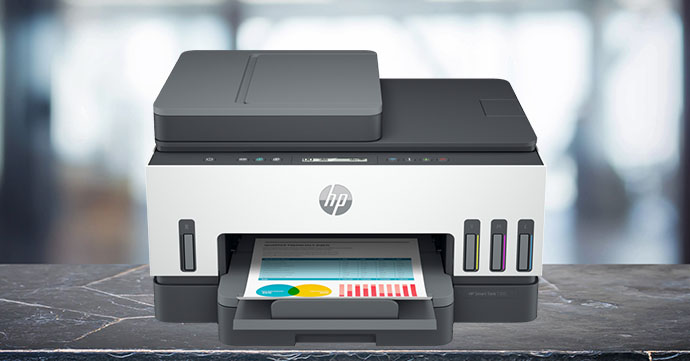
Hassle-free printing for smaller workspaces.
Functionality: Print, copy, scan
Print Speed: Up to 23ppm (mono) / 22ppm (colour)
Paper Capacity: 250 sheets
Connectivity: USB, ethernet, Wi-Fi Direct
Ideal User: SOHO users
Pros:
- MFP
- Fast max print speeds
- Range of connectivity options
- Auto duplex printing
Cons:
- No fax
Experience intuitive, effortless home or small office (SOHO) printing with the HP Smart Tank 7305 printer.
The use of ink bottles ensures replacing your printer ink is a quick task and means you can get back to printing faster. Manufactured using a high proportion of recycled plastics, the HP 7305 is a great option for those looking to make their printing more eco-friendly. It’s even EPEAT Silver certified!
Prioritising convenience, it’s great for those printing at home. Smart-guided buttons help you throughout your printing task, for added convenience.
Featuring wireless connectivity you can depend on, as well as a range of features which are ideal for home workers, the HP Smart Tank 7305 is our choice of the best ink tank for SOHO users.
Shop the HP Smart Tank 7305
Best Ink Tank Printer for Home Use
Epson EcoTank ET-1810
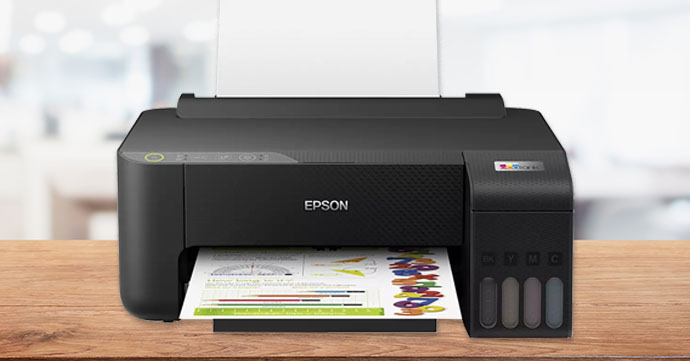
Straightforward home printing that focuses on convenience.
Functionality: Print-only
Print Speed: Up to 33ppm (mono), 15ppm (colour)
Paper Capacity: 100 sheets standard
Connectivity: Wi-Fi, Wi-Fi Direct, USB
Ideal User: Home printer
Pros:
- Fast max mono print speeds
- Connectivity options
Cons:
- Print-only
- Max colour print speeds could be faster
Home printing tasks are quick, simple but effective with the Epson EcoTank ET-1810.
A major selling point of this Epson printer is its easy refills, simply top up the ink tank with the key-lock bottles and continue printing, with no cartridge waste whatsoever.
Wi-Fi connectivity is great for those printing at home, as it means your computer doesn’t have to be plugged in to the printer, saving you space when it’s limited. Wi-Fi Direct even allows you to print without the need for a wireless network, as the printer can create its own Wireless Access Point.
A paper capacity of 100 sheets and high yield ink bottles ensure disruptions to your printing are minimised. While the Epson ET-1810 can’t scan or copy by itself, this can be done via the Epson Smart Panel app, expanding the functionality of this home printer.
Shop the Epson EcoTank ET-1810

Best Wireless Ink Tank Printer
HP Smart Tank 7005
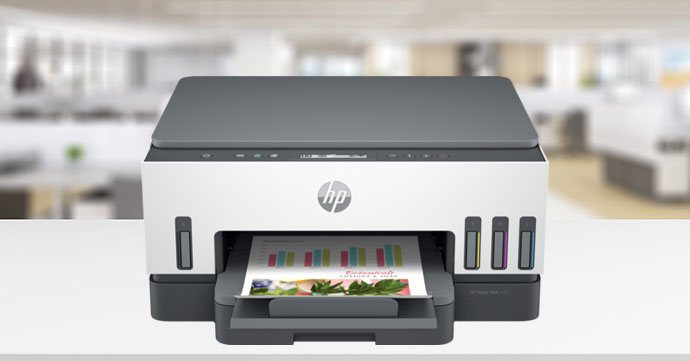
Easy and convenient wireless printing.
Functionality: Print, copy, scan
Print Speed: Up to 23ppm (mono) / 22ppm (colour)
Paper Capacity: Up to 250 sheets
Connectivity: USB, Wi-Fi, Wi-Fi Direct, wireless
Ideal User: SOHO
Pros:
- High paper capacity
- Wi-Fi Direct
- Mobile print support
Cons:
- No fax
Experience simple wireless printing with the HP Smart Tank 7005. Designed to streamline the printing process, this HP ink tank works with a range of mobile print services to facilitate printing from your smart device:
- HP Smart app
- HP Print Service Plugin (Android)
- Apple AirPrint
- Mopria certified
- Wi-Fi Direct
Wi-Fi Direct functionality allows you to print wirelessly without a network, as the printer creates a Wireless Access Point that your device can connect to. This is great for those printing in locations with limited connectivity options.
Priotising convenient printing, the HP 7005 features a paper capacity of up to 250 sheets, which means trips to the printer to replace your paper supply won’t be frequent.
Ideally suited to both home office and small office use, the HP Smart Tank 7005 is our recommendation for the best wireless ink tank printer.
Shop the HP Smart Tank 7005
Best Eco-Friendly Ink Tank Printer
Epson EcoTank ET-M3140
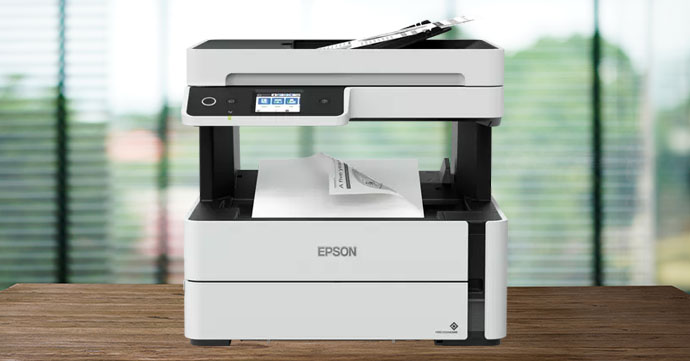
Eco-conscious printing that doesn’t compromise on productivity.
Functionality: Print, copy, scan, fax
Print Speed: Up to 39ppm (mono)
Paper Capacity: 250 sheets
Connectivity: USB
Ideal User: Business, home office
Pros:
- All-in-one
- Quick print speeds
- High paper capacity
Cons:
- No colour print support
- USB only connectivity
A great choice for those who want to prioritise eco-friendliness, the Epson EcoTank ET-M3140 is our choice for eco-friendly ink tank. Designed to reduce the environmental impact of printing, auto duplex printing support halves your paper usage by allowing you to print on both sides of the page, without having to manually turn the page over.
The EcoTank ET-M3140 also includes a range of features and specifications to make the printing process more productive. These include impressively fast print speeds of up to 39ppm, as well as print/scan/copy/fax functionality. The 250 sheet paper capacity also ensures replacements are minimal and infrequent, preventing disruptions to your home office or workplace. While it can’t print in colour, it is a versatile and powerful printer that’s ideal for use in a busy working environment.
An environmentally-friendly ink tank system, combined with automatic double-sided printing, ensures the Epson EcoTank ET-M3140 is a great pick for environmentally-conscious printer users.
Shop the Epson EcoTank ET-M3140


Best Wide-Format Ink Tank Printer
Epson EcoTank ET-M16600
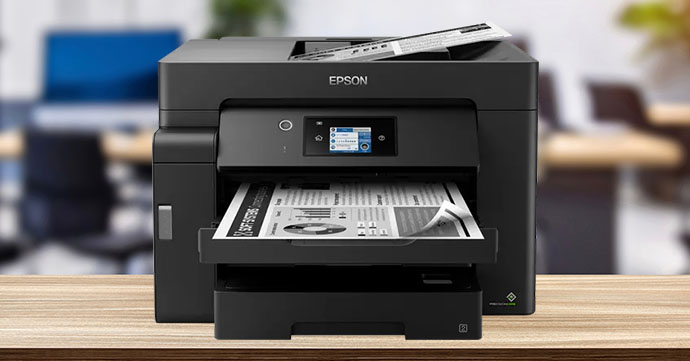
Wider, professional prints for workplaces.
Functionality: Print, copy, scan
Print Speed: Up to 32ppm (mono)
Paper Capacity: Up to 550 sheets
Connectivity: Ethernet, wireless, Wi-Fi Direct, USB
Ideal User: Businesses that need A3+ prints.
Pros:
- Fast print speed
- Supports a wide range of media sizes
- ADF
- Touchscreen
- High paper capacity
Cons:
- No fax
- Mono only printing
Our pick of the best wide-format ink tank has to be the Epson EcoTank ET-M16600. Capable of producing A3+ prints, businesses would benefit from this printer as they could use it to produce clear, sharp documents, like reports or presentation materials, for example.
Sporting fast print speeds, the Epson ET-M16600 can print up to 32ppm. Supporting the efficient running of your workplace, the 6.8cm LCD touchscreen makes exploring the printer’s features effortless and intuitive. The inclusion of an ADF also makes the process more streamlined.
Choose the Epson EcoTank ET-M16600 if you need wider prints, with a variety of features to support the smooth running of your workplace.
Shop the Epson EcoTank ET-M16600

Best Ink Tank Photo Printer
Epson EcoTank ET-2856
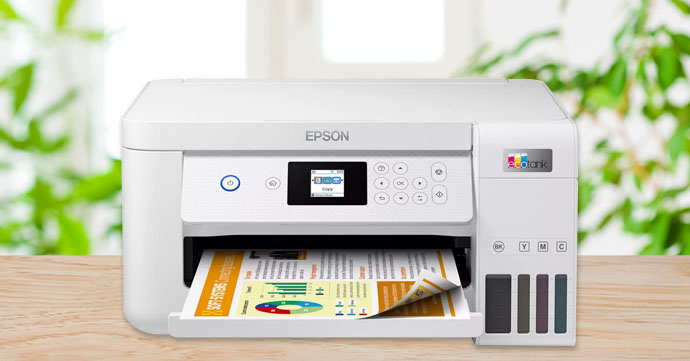
Vibrant, high-resolution photo printing.
Functionality: Print, copy, scan
Print Speed: Up to 33ppm (mono) / 15ppm (colour)
Paper Capacity: 100 sheets (standard)
Connectivity: Wi-Fi, Wi-Fi Direct, USB
Ideal User: Photo printers
Pros:
- 5,760 x 1,440 dpi
- Borderless photo printing
- High yield ink
- Auto duplex printing
Cons:
- No fax
- No touchscreen
Produce high-quality photos with the Epson EcoTank ET-2856, thanks to a range of features designed to create vibrant and clear photo prints.
Borderless photo printing ensures you don’t have to trim the border of your prints, for smoother edges and a more professional appearance. The high print resolution (5,760 x 1,440 dpi) facilitates the printing of photos with impressive levels of detail. With both Wi-Fi and Wi-Fi Direct support, you can make the photo printing process more streamlined. Finally, the Epson 102 ink bottles the EcoTank ET-2856 accepts can print up to 7,500 pages (black) and 6,000 pages (cyan/magenta/yellow) each.
Shop the Epson EcoTank ET-2856

Why Choose an Ink Tank Printer?
One advantage of ink tank printers is that the consumables are generally lower in price. With high-yield bottles, you won’t need to constantly replace your printer ink and can top up as and when you need to. Front-facing ink tanks provide a handy visual reminder of how much ink you have left, so you can be ready to change your ink ahead of time.
Printer Specifications to Look Out For
When choosing a new printer, it’s important to take a look at the specifications to ensure it meets your requirements. You should consider the following if you’d like to buy a new ink tank printer:
Auto Duplex Printing
An eco-friendly feature to consider is duplex printing, which can reduce your paper usage by 50% by printing on both sides of the page. Some printers allow you to do so automatically, eliminating the need to turn the pages over manually. Undoubtedly better for the environment, look out for this functionality to use half as much paper as you would do otherwise.
Eco Features
Additionally, you should pay close attention to any eco-friendly features your prospective ink tank printer has. For example, some printers will include auto-on/off technology. These useful features prevent you from wasting energy and allow you to better plan your printing/energy use by setting it to power up and turn off at specific times determined by you. You should also look to see if the printer has any environmental certifications, as these should be listed in the printer’s specifications.
Print Resolution
Those wanting professional, high-quality prints from their ink tank should consider the device’s print resolution. This metric is measured in DPI, which stands for dots per inch and lets you know how detailed your printout will be. Ink tank printers are more than capable of producing great quality prints.
Print Speed
Print speed is an important factor to consider, especially for business users who rely on fast, efficient printing. PPM (or IPM) are used to indicate the speed of the printer, and stand for pages per minute and images per minute, respectively. A fast print speed can determine how productive your office is.
AIO/Single-Function
Widen the range of tasks your ink tank can carry out with an all-in-one (AIO) printer. Capable of scanning, copying and (sometimes) faxing, in addition to printing, while these types of machine will be more expensive, it’s worth it to take advantage of the additional functionality these devices provide. They’re only worth the additional cost if you’ll use this functionality however, so consider this carefully.
Connectivity
Think about the connectivity options you need from your printer. Would you like to print wirelessly for example, or would standard ethernet and USB connectivity be a better option for you? Perhaps you want to streamline the process and print from your mobile. Find the method of connecting to your printer that works best for you and look for this when choosing an ink tank.
To Sum Up
We hope this guide has given you enough information to choose the best ink tank printer for your printing requirements. If you need more advice on printers and office supplies, here at Cartridge People we have a wide selection of comprehensive guides to help you make a decision. These include general guidance on buying a printer, our expert recommendations of the best inkjet printers and our guide to printer paper.
About Cartridge People
Cartridge People provides a large range of office products. Whether you’re looking for ink and toner solutions, such as Xerox toners, cartridges for Canon printers and HP printer cartridges or stationery supplies, you’ll find what you’re looking for at Cartridge People.
About The Author
