


 FREE Delivery over £35
 Unbeatable Prices
Free UK Invoice Template: Editable PDF to Fill in Online or in Acrobat
Creating an invoice shouldn’t take longer than doing the work you’re invoicing for. That’s why we’ve created a free invoice template that UK freelancers, sole traders, start-ups and small businesses can use to produce clear, professional invoices quickly.
Our printable invoice template is provided as an editable PDF, so you can fill in your details digitally using Adobe Acrobat or a compatible online PDF editor. Once complete, simply save a copy, email it to your customer or print it for your records.
Download the free UK invoice template PDF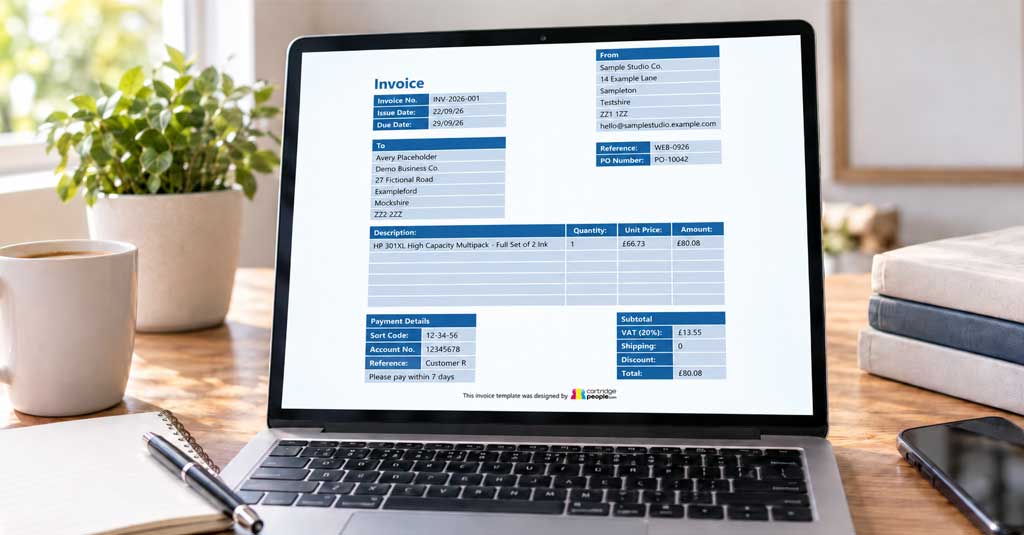
Free UK Invoice Template
Our free invoice template gives you a straightforward way to create professional-looking invoices without designing one from scratch.
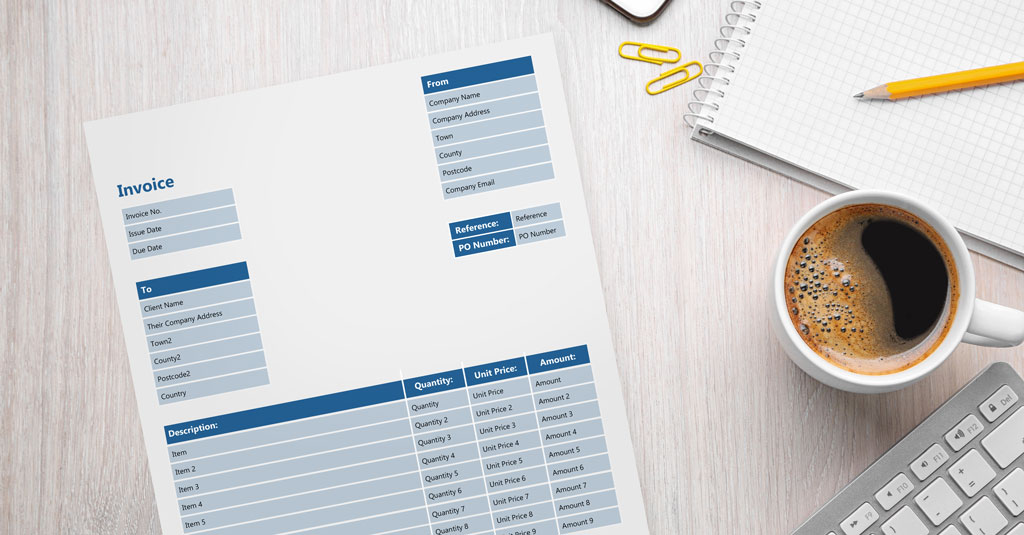
The template includes space for your company and customer details, invoice number, issue and due dates, references, individual products or services, quantities, unit prices, totals and payment information.
Because it’s a fillable PDF, you can type directly into the fields rather than having to print the invoice and complete it by hand. Open it in Adobe Acrobat or a suitable online PDF editor, enter your information and save the completed version.
It’s also designed to be print friendly if you prefer keeping or sending paper copies.
Download the editable PDFWhat Should an Invoice Include?
A good invoice should make it immediately clear who is requesting payment, what the customer is being charged for and when payment is due.
For a straightforward UK business invoice, you’ll usually want to include your business or supplier name and contact details, your customer’s details, a unique invoice number, the invoice date and relevant supply date, and a clear description of the goods or services supplied.
You should also show the quantity or rate where relevant, the amount charged and the overall total. If VAT applies to your business and the transaction, include the relevant VAT information too.
Finally, make your payment terms easy to find. Include a due date along with the information the customer needs to pay you, such as your bank details and the payment reference they should use.
Requirements can vary according to your business and VAT status, so make sure the information on your invoices is appropriate for your circumstances.
How to Create an Invoice Using Our Template
The template is designed to make invoicing as quick as possible:
- Open the template. Download the editable PDF and open it in Adobe Acrobat or a compatible online PDF editor.
- Enter your business details. Add your company name, address and email address.
- Complete the invoice information. Add a unique invoice number together with the issue date, due date and any relevant purchase order or customer reference.
- Add your customer’s details. Enter the client name, company address and other information required.
- List the products or services. Describe each item and enter its quantity, unit price and amount.
- Complete the totals. Add VAT where applicable, along with any shipping costs or discounts, before entering the final total.
- Add your payment details. Enter the bank details and reference the customer should use when making payment.
- Check and send it. Proofread the invoice, save a completed copy and send it to your customer.
It’s worth saving an untouched copy of the original template too. That way, you’ve always got a clean invoice ready for your next customer.
PDF, Word or Excel Invoice Template: Which Should You Use?
An invoice template Word document can work well if you mainly want easy control over fonts, layout and written information. Word is familiar to many businesses and is particularly useful for simple invoices without lots of calculations.
An invoice template Excel spreadsheet can be a better choice when you regularly work with multiple quantities, rates or calculations. Formulas can automatically calculate subtotals, VAT and final amounts, reducing the amount of manual arithmetic required.
A fillable PDF offers another useful option. The formatting stays consistent each time you use it and you don’t need to rearrange cells or document elements. For businesses that want a clean invoice they can complete, save and send, our editable PDF template is a simple solution.
Whichever format you use, the most important thing is to keep your invoices clear, consistent and easy for customers to understand.
Tips for Creating a Professional Invoice
Consistency can make even a simple invoice look more professional. Use the same business name, contact information and branding across your invoices and other customer communications.
Give every invoice its own unique number and use a numbering system that’s easy to follow. Keeping invoice numbers organised makes it much easier to find previous invoices and maintain accurate business records.
Payment information should also be obvious. Don’t make customers search through an email conversation to discover how or when they’re supposed to pay. State the payment deadline on the invoice and make sure the account information and payment reference are correct.
Before sending anything, double-check customer names, prices, quantities, dates and bank details. A quick proofread can save lengthy email exchanges later.
And remember to retain copies of completed invoices as part of your business records.
For the rest of your workplace essentials, from printer paper and stationery to ink and toner, take a look at the Cartridge People Office Supplies range.
Office Essentials for Invoicing


UK Invoice Template FAQs
Ready to create your invoice? Download our free editable UK invoice template.
About The Author
