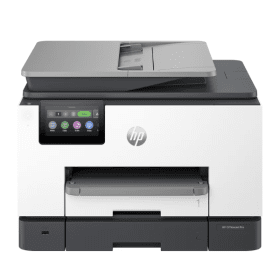
HP OfficeJet Pro 9132e A4 Colour Multifunction Inkjet Printer (Wireless) Description
Dynamic security enabled printer:
Certain HP printers are intended to work only with cartridges that have a new or reused HP chip or electronic circuitry. These printers use dynamic security measures to block cartridges using a non-HP chip or electronic circuitry. Periodic firmware updates will maintain the effectiveness of these measures and block cartridges that previously worked. Reused HP chips and electronic circuitry enable the use of reused, remanufactured, and refilled cartridges. Learn More
Overview:
The HP OfficeJet Pro 9132e is a multifunction printer with exceptional, print, copy, scan and fax specification. The fantastic print speed of 39 ppm is matched by the other functions, with a copy speed of 23 cpm, 18 ipm scanning and 4-second faxing on offer.
This speed doesn't come at the expense of quality, as the 1200 x 1200 dpi print resolution ensures high-quality output that is maintained among the other functions. Similarly, there is also an impressive amount of useful features on offer such as the ability to resize photocopies or automatically redial when sending faxes to help streamline your office.
It has two 250-sheet paper trays ensuring you won't constantly run out of paper and can use different sizes and styles of paper without having to manually refill your printer. It can print, copy and scan two-sided to help this paper last even longer while the inclusion of a 35-sheet ADF means it can easily copy and scan multi-page documents saving you time and hassle.
Finally, the 9132e also has a range of connectivity options including ethernet and wireless, making it the perfect option for either a single user or a larger group. It also has mobile printing available providing you with greater flexibility to use the printer from throughout your office, while the variety of compatible operating systems means you can connect to it from a variety of devices. It even has a 10.92cm touchscreen display making it easy to alter settings and select functions.
Important Detail:
- This Printer is not supplied with a USB Cable
- Select your cable here
Manufacturer Support
Information on the support available in the unlikely event that there is a problem with a printer bought from Cartridge People and details on the manufacturer support available can be found here.


 FREE Delivery over £35
 Unbeatable Prices