What home users can expect from the Epson Expression Home XP-225 is a machine that can print, scan and copy wirelessly to produce high quality results.
In terms of quality and affordability, users can expect to enjoy both these characteristics from the ink cartridge range available via Cartridge People. These low cost consumables will combine with the XP-225 to optimise your home printing.


Black
Number in Pack: 1
Volume of Ink: 12ml each, 4% extra ink vs the OEM option
MPN: C13T18114012, T1811
Cyan
Number in Pack: 1
Volume of Ink: 11ml each, 66% extra ink vs the OEM option
MPN: C13T18124012, T1812
Magenta
Number in Pack: 1
Volume of Ink: 11ml each, 66% extra ink vs the OEM option
MPN: C13T18134012, T1813
Yellow
Number in Pack: 1
Volume of Ink: 11ml each, 66% extra ink vs the OEM option
MPN: C13T18144012, T1814
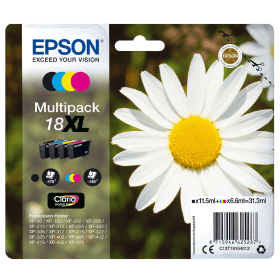
Black
Number in Pack: 1
Volume of Ink: 11.5ml each
MPN: C13T18114012, T1811
Cyan
Number in Pack: 1
Volume of Ink: 6.6ml each
MPN: C13T18124012, T1812
Magenta
Number in Pack: 1
Volume of Ink: 6.6ml each
MPN: C13T18134012, T1813
Yellow
Number in Pack: 1
Volume of Ink: 6.6ml each
MPN: C13T18144012, T1814

Black
Number in Pack: 1
Volume of Ink: 5.2ml each
MPN: C13T18014012, T1801
Cyan
Number in Pack: 1
Volume of Ink: 3.3ml each
MPN: C13T18024012, T1802
Magenta
Number in Pack: 1
Volume of Ink: 3.3ml each
MPN: C13T18034012, T1803
Yellow
Number in Pack: 1
Volume of Ink: 3.3ml each
MPN: C13T18044012, T1804

Black
Number in Pack: 1
Volume of Ink: 12ml each, 4% extra ink vs the OEM option
MPN: C13T18114012, T1811

Black
Number in Pack: 1
Volume of Ink: 11.5ml each
MPN: C13T18114012, T1811

Black
Number in Pack: 1
Volume of Ink: 5.2ml each
MPN: C13T18014012, T1801

Cyan
Number in Pack: 1
Volume of Ink: 11ml each, 66% extra ink vs the OEM option
MPN: C13T18124012, T1812

Cyan
Number in Pack: 1
Volume of Ink: 6.6ml each
MPN: C13T18124012, T1812

Cyan
Number in Pack: 1
Volume of Ink: 3.3ml each
MPN: C13T18024012, T1802

Magenta
Number in Pack: 1
Volume of Ink: 11ml each, 66% extra ink vs the OEM option
MPN: C13T18134012, T1813

Magenta
Number in Pack: 1
Volume of Ink: 6.6ml each
MPN: C13T18134012, T1813

Magenta
Number in Pack: 1
Volume of Ink: 3.3ml each
MPN: C13T18034012, T1803

Yellow
Number in Pack: 1
Volume of Ink: 11ml each, 66% extra ink vs the OEM option
MPN: C13T18144012, T1814

Yellow
Number in Pack: 1
Volume of Ink: 6.6ml each
MPN: C13T18144012, T1814

Yellow
Number in Pack: 1
Volume of Ink: 3.3ml each
MPN: C13T18044012, T1804
Compact and with print, scan and copy functionality, the Epson Expression Home XP-225 forms part of Epson’s small-in-one range of inkjets.
These printers are the smallest printers to be produced by Epson and can give cost savings through the use of their individual ink cartridge system. By using Epson’s Claria Home Ink, users will enjoy crisp text documents alongside lab quality photo prints.
Configuring the wireless connectivity for the XP-225 is an easy process as a result of the printer’s automatic Wi-Fi set up. This feature is able to find the relevant connection settings needed in order to configure itself.
Amongst the wireless printing options is Epson Connect which includes Epson iPrint. This allows users to enjoy greater freedom in their printing by being able to print from smartphones and tablets. It’s also possible to print from anywhere in the world by emailing documents and photos to the printer directly.
For added cost savings, users can make their printing go further by purchasing XL ink cartridges which are able to be used in the XP-225.
This machine has a paper capacity of 50 sheets whilst its small footprint means it can be easily accommodated anywhere in the home.
Part of Epson’s range of small-in-one home inkjets, the Epson Expression Home XP-225 is a good value multifunctional printer with wireless printing capabilities.
According to Epson, the XP-225 is a compact printer, scanner and copier that also features the added benefits of Wi-Fi connectivity and mobile printing from anywhere. With a small footprint, this machine can easily be accommodated on a desktop whether that is in the home or even in a university student’s halls of residence.
The XP-225 is easy to set up and is capable of finding your connection settings to configure the wireless printing functionality (as opposed to printers which require you to know your network settings and go through the Wi-Fi set up). Once your machine is connected to your network, you will be able print and scan wirelessly with ease.
In terms of actual print performance, it offers a good quality range of prints from text documents to photographs (5760 x 1440dpi print resolution). The XP-225 was introduced to the market with photo-printing in mind. Even on the packaging, Epson makes the point of telling users how you can print your Facebook photos.
This printer is also a good performer when it comes to print speed. On optimum settings, text documents are printed at a pleasing 26 pages per minute which is good news for those homes with children looking to print off homework or even for students printing off university assignments/dissertations.
An LCD screen makes the printer an easy-to-use machine which should require little in the way of maintenance. It’s important to remember though that small-in-ones are designed with the home user in mind so if you were looking for a small office printer, you’d probably be best looking for a device capable of handling more than the 50 sheets of A4 the XP-225 is capable of.
Pros
Cons
Star Rating: 4.5


 FREE Delivery over £35
 Unbeatable Prices



