Ultra compact, user friendly and with Wi-Fi connectivity; the Epson Expression Home XP-202 offers users a value for money inkjet that can produce quality results.
As one of Epson’s small-in-one range, this machine is capable of printing, scanning and copying whilst also having the functionality for users to enjoy mobile printing. Users will also be able to enjoy low cost, high quality printing by using ink cartridges available online from Cartridge People.


Black
Number in Pack: 1
Volume of Ink: 12ml each, 4% extra ink vs the OEM option
MPN: C13T18114012, T1811
Cyan
Number in Pack: 1
Volume of Ink: 11ml each, 66% extra ink vs the OEM option
MPN: C13T18124012, T1812
Magenta
Number in Pack: 1
Volume of Ink: 11ml each, 66% extra ink vs the OEM option
MPN: C13T18134012, T1813
Yellow
Number in Pack: 1
Volume of Ink: 11ml each, 66% extra ink vs the OEM option
MPN: C13T18144012, T1814
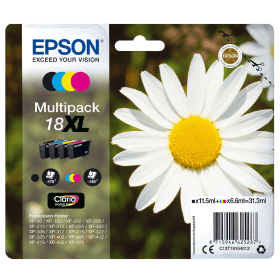
Black
Number in Pack: 1
Volume of Ink: 11.5ml each
MPN: C13T18114012, T1811
Cyan
Number in Pack: 1
Volume of Ink: 6.6ml each
MPN: C13T18124012, T1812
Magenta
Number in Pack: 1
Volume of Ink: 6.6ml each
MPN: C13T18134012, T1813
Yellow
Number in Pack: 1
Volume of Ink: 6.6ml each
MPN: C13T18144012, T1814

Black
Number in Pack: 1
Volume of Ink: 5.2ml each
MPN: C13T18014012, T1801
Cyan
Number in Pack: 1
Volume of Ink: 3.3ml each
MPN: C13T18024012, T1802
Magenta
Number in Pack: 1
Volume of Ink: 3.3ml each
MPN: C13T18034012, T1803
Yellow
Number in Pack: 1
Volume of Ink: 3.3ml each
MPN: C13T18044012, T1804

Black
Number in Pack: 1
Volume of Ink: 12ml each, 4% extra ink vs the OEM option
MPN: C13T18114012, T1811

Black
Number in Pack: 1
Volume of Ink: 11.5ml each
MPN: C13T18114012, T1811

Black
Number in Pack: 1
Volume of Ink: 5.2ml each
MPN: C13T18014012, T1801

Cyan
Number in Pack: 1
Volume of Ink: 11ml each, 66% extra ink vs the OEM option
MPN: C13T18124012, T1812

Cyan
Number in Pack: 1
Volume of Ink: 6.6ml each
MPN: C13T18124012, T1812

Cyan
Number in Pack: 1
Volume of Ink: 3.3ml each
MPN: C13T18024012, T1802

Magenta
Number in Pack: 1
Volume of Ink: 11ml each, 66% extra ink vs the OEM option
MPN: C13T18134012, T1813

Magenta
Number in Pack: 1
Volume of Ink: 6.6ml each
MPN: C13T18134012, T1813

Magenta
Number in Pack: 1
Volume of Ink: 3.3ml each
MPN: C13T18034012, T1803

Yellow
Number in Pack: 1
Volume of Ink: 11ml each, 66% extra ink vs the OEM option
MPN: C13T18144012, T1814

Yellow
Number in Pack: 1
Volume of Ink: 6.6ml each
MPN: C13T18144012, T1814

Yellow
Number in Pack: 1
Volume of Ink: 3.3ml each
MPN: C13T18044012, T1804
What the Epson Expression Home XP-202 allows users to do is print wirelessly from smartphones and tablets thanks to Wi-Fi connectivity and the Epson iPrint app.
This app provides users with the flexibility and freedom to print from anywhere in the home. Setting the XP-202 up in order to print and scan wirelessly is an easy process with the inclusion of automatic Wi-Fi set up that automatically finds the relevant connection settings and then configures itself. This means that you don’t need to know your network settings or need to connect to the printer with a USB cable.
With the XP-202 only using individual ink cartridges, users can enjoy cost savings by only needing to replace the ink that’s been used. For added convenience as well as cost savings, XL sized ink cartridges are available for the XP-202 meaning your printing can go further.
Clear and crisp documents alongside vivid and vibrant colour photographs can be expected when you use Epson’s Claria Home Ink which provides both affordable and reliable printing. These cartridges can be easily identified with the packaging showing a Daisy image on the front of the product.
In addition to a 100-sheet paper capacity, this printer can provide users with a print resolution of 5760 x 1440dpi as well as a scan resolution 1200 x 2400dpi.
The Epson Expression Home XP-202 is a compact printer, scanner and copier that is perfect for those who have very little desk space but need a device that performs multiple functions.
The printer on the XP-202 can use Claria Home Ink technology to create very clear documents and glossy photos. It can print images up to 5760 by 1440dpi and is rated at 30 pages per minute monochrome and 15 pages per minute in full colour. It can print a borderless 10 by 15cm photo in just under a minute.
The printer uses four different ink cartridges – yellow, magenta, cyan, and black; users can also purchase XL size ink cartridges. It can hold 100 sheets in the paper tray and can print on a variety of different paper sizes.
The scanner on the XP-202 scans at a maximum resolution of 1200 by 2400dpi. Users can scan items to a variety of different devices thanks to the wireless function, which also allows for wireless printing.
The Wi-Fi features Epson’s automatic set up to detect and connect to the network and devices automatically without being connected to a PC so you can print with confidence.
Pros
Cons
Star Rating: 3


 FREE Delivery over £35
 Unbeatable Prices



