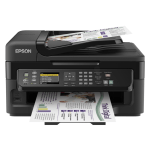
An automatic document feeder is amongst the many features making the Epson Workforce WF-2530WF an ideal printer for the small office home office (SOHO) user.
Along with having the ability to print, copy, scan and fax; this machine is able to accommodate XL cartridges that can help make your office printing go further. When you add the cost savings that can be made through purchasing printer consumables from Cartridge People, you can help minimise your office printing costs without compromising on quality.


Black
Number in Pack: 1
Volume of Ink: 5ml each
MPN: C13T16214012, T1621
Cyan
Number in Pack: 1
Volume of Ink: 3ml each
MPN: C13T16224012, T1622
Magenta
Number in Pack: 1
Volume of Ink: 3ml each
MPN: C13T16234012, T1623
Yellow
Number in Pack: 1
Volume of Ink: 3ml each
MPN: C13T16244012, T1624

Black
Number in Pack: 1
Volume of Ink: 17ml each, 31% extra ink vs the OEM option
MPN: C13T16314012, T1631
Cyan
Number in Pack: 1
Volume of Ink: 11.6ml each, 78% extra ink vs the OEM option
MPN: C13T16324012, T1632
Magenta
Number in Pack: 1
Volume of Ink: 11.6ml each, 78% extra ink vs the OEM option
MPN: C13T16334012, T1633
Yellow
Number in Pack: 1
Volume of Ink: 11.6ml each, 78% extra ink vs the OEM option
MPN: C13T16344012, T1634

Black
Number in Pack: 1
Volume of Ink: 12.9ml each
MPN: C13T16314012, T1631
Cyan
Number in Pack: 1
Volume of Ink: 6.5ml each
MPN: C13T16324012, T1632
Magenta
Number in Pack: 1
Volume of Ink: 6.5ml each
MPN: C13T16334012, T1633
Yellow
Number in Pack: 1
Volume of Ink: 6.5ml each
MPN: C13T16344012, T1634

Black
Number in Pack: 1
Volume of Ink: 17ml each, 31% extra ink vs the OEM option
MPN: C13T16314012, T1631

Black
Number in Pack: 1
Volume of Ink: 12.9ml each
MPN: C13T16314012, T1631

Black
Number in Pack: 1
Volume of Ink: 5ml each
MPN: C13T16214012, T1621

Cyan
Number in Pack: 1
Volume of Ink: 6.5ml each
MPN: C13T16324012, T1632

Cyan
Number in Pack: 1
Volume of Ink: 3ml each
MPN: C13T16224012, T1622

Cyan
Number in Pack: 1
Volume of Ink: 11.6ml each, 78% extra ink vs the OEM option
MPN: C13T16324012, T1632

Magenta
Number in Pack: 1
Volume of Ink: 3ml each
MPN: C13T16234012, T1623

Magenta
Number in Pack: 1
Volume of Ink: 11.6ml each, 78% extra ink vs the OEM option
MPN: C13T16334012, T1633

Magenta
Number in Pack: 1
Volume of Ink: 6.5ml each
MPN: C13T16334012, T1633

Yellow
Number in Pack: 1
Volume of Ink: 6.5ml each
MPN: C13T16344012, T1634

Yellow
Number in Pack: 1
Volume of Ink: 3ml each
MPN: C13T16244012, T1624

Yellow
Number in Pack: 1
Volume of Ink: 11.6ml each, 78% extra ink vs the OEM option
MPN: C13T16344012, T1634
It’s possible to print from anywhere in the world through emailing your photographs and documents directly to the Epson WorkForce WF-2530WF.
This type of connectivity will be appreciated by small office home office users who can also expect to enjoy professional quality business documents. Ensuring this level of quality is a print resolution of 5760 x 1440dpi. The inclusion of an automatic document feeder can improve office productivity as well as the machine’s print speeds of 34ppm for mono and 18ppm for colour.
A compact device that has a robust and durable build quality to go with a small footprint, this printer also has flexible connectivity options. Those looking to print from their smartphones or tablets can do so through using Epson Connect whilst both Apple AirPrint and Google Cloud Print are supported.
An automatic Wi-Fi set up will see the printer identify the user’s relevant connection settings to configure itself.
Contributing to a high standard of printing are the individual ink cartridges containing Epson’s fast drying DURABrite Ultra Ink. This ink will deliver prints that are water, smudge and highlighter resistant.
Complete with the ability to print, copy, scan and fax; the Epson WorkForce WF-2530WF is an all-in-one capable of maintaining the smooth running of your small office or home office at an affordable price.
The Epson WorkForce WF-2530WF Ultra Compact 4-in-1 Printer is a compact all-in-one printer that prints, scans, copies and faxes.
It is designed for a home office or a small office that does a fair amount of printing each month. The WF-2530WF also includes extra features such as a 30-page automatic document feeder that makes scanning very easy.
Users can print without a PC via networking.
The Epson DURABrite Ultra Ink dries very quickly and is resistant to smudging, water spills and highlighters. XL cartridges are also available for those that need to print a very high volume of work.
Epson Connect lets users quickly connect their wireless devices, including their tablets, smartphones and laptops, to the printer. While printing from the home network is simple enough, Epson’s Remote Printer Driver allows users to print from anywhere – simply email the document or photo to the printer and it prints.
The printer can also print from or scan to Google Cloud or from Apple devices via Apple AirPrint.
Pros
Cons
Star Rating: 4


 FREE Delivery over £35
 Unbeatable Prices



