

Black
Number in Pack: 1
Volume of Ink: 5ml each
MPN: C13T16214012, T1621
Cyan
Number in Pack: 1
Volume of Ink: 3ml each
MPN: C13T16224012, T1622
Magenta
Number in Pack: 1
Volume of Ink: 3ml each
MPN: C13T16234012, T1623
Yellow
Number in Pack: 1
Volume of Ink: 3ml each
MPN: C13T16244012, T1624

Black
Number in Pack: 1
Volume of Ink: 17ml each, 31% extra ink vs the OEM option
MPN: C13T16314012, T1631
Cyan
Number in Pack: 1
Volume of Ink: 11.6ml each, 78% extra ink vs the OEM option
MPN: C13T16324012, T1632
Magenta
Number in Pack: 1
Volume of Ink: 11.6ml each, 78% extra ink vs the OEM option
MPN: C13T16334012, T1633
Yellow
Number in Pack: 1
Volume of Ink: 11.6ml each, 78% extra ink vs the OEM option
MPN: C13T16344012, T1634

Black
Number in Pack: 1
Volume of Ink: 12.9ml each
MPN: C13T16314012, T1631
Cyan
Number in Pack: 1
Volume of Ink: 6.5ml each
MPN: C13T16324012, T1632
Magenta
Number in Pack: 1
Volume of Ink: 6.5ml each
MPN: C13T16334012, T1633
Yellow
Number in Pack: 1
Volume of Ink: 6.5ml each
MPN: C13T16344012, T1634

Black
Number in Pack: 1
Volume of Ink: 17ml each, 31% extra ink vs the OEM option
MPN: C13T16314012, T1631

Black
Number in Pack: 1
Volume of Ink: 12.9ml each
MPN: C13T16314012, T1631

Black
Number in Pack: 1
Volume of Ink: 5ml each
MPN: C13T16214012, T1621

Cyan
Number in Pack: 1
Volume of Ink: 6.5ml each
MPN: C13T16324012, T1632

Cyan
Number in Pack: 1
Volume of Ink: 3ml each
MPN: C13T16224012, T1622

Cyan
Number in Pack: 1
Volume of Ink: 11.6ml each, 78% extra ink vs the OEM option
MPN: C13T16324012, T1632

Magenta
Number in Pack: 1
Volume of Ink: 3ml each
MPN: C13T16234012, T1623

Magenta
Number in Pack: 1
Volume of Ink: 11.6ml each, 78% extra ink vs the OEM option
MPN: C13T16334012, T1633

Magenta
Number in Pack: 1
Volume of Ink: 6.5ml each
MPN: C13T16334012, T1633

Yellow
Number in Pack: 1
Volume of Ink: 6.5ml each
MPN: C13T16344012, T1634

Yellow
Number in Pack: 1
Volume of Ink: 3ml each
MPN: C13T16244012, T1624

Yellow
Number in Pack: 1
Volume of Ink: 11.6ml each, 78% extra ink vs the OEM option
MPN: C13T16344012, T1634
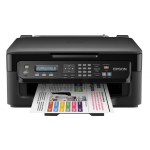
Backed by flexible connectivity options which will allow you to easily gain access via a Wi-Fi network, the Epson WorkForce WF-2510WF is a reliable and versatile performer whether you’re printing, scanning and copying.
It’s possible to print from the WF-2510WF without knowing your network settings thanks to the automatic Wi-Fi set up available. The printer will find the relevant settings automatically to configure itself.
This is a feature geared towards improving productivity should you require the WF-2510WF to act as a home office printer. There is also the added benefit of being able to print wirelessly from smartphones and tablet PCs within a home or office setting.
Whether you’re printing documents or colour photographs, Epson’s DURABrite Ultra Ink will provide you with quick-drying results which are also water, smudge and highlighter resistant. You can enjoy more printing by opting for XL ink cartridges which are accepted by this printer.
Even as a compact all-in-one, the WF-2510WF has a paper capacity of 100 sheets and can use a variety of paper types for versatile printing.
Quick print speeds alongside good text quality can be expected when using the Epson WorkForce WF-2510WF at home or at work.
With its box-like build quality, the machine won’t be too obtrusive on a desktop whilst there is an added benefit for business users with it being able to fax. The usability of this all-in-one is helped by the number of buttons on the front panel to help you navigate your way through a number of functions.
The WF-2510WF’s low price means that this is a printer more suited to the occasional user who wishes to print documents for business or for a child’s school work. Photo printing is perhaps inhibited by the price and isn’t as high a standard as you would like to see.
Wi-Fi connectivity is included to give you the option to print from anywhere in the home although there is no Automatic Document Feeder provided. Being able to fax is a welcome bonus for users.
As a cheap Epson printer, the WF-2510WF has a lot to offer although it would be best to look elsewhere if you’re looking to print high quality photographs regularly.
Pros
Cons
Star Rating: 4


 FREE Delivery over £35
 Unbeatable Prices



