Maintaining Canon’s reputation for affordability and versatility is the Canon Pixma MP270 which offers quick printing without compromising on quality.
That same affordability, versatility and high quality can be found in the range of ink cartridge products available via Cartridge People. This printer can help deliver the type of photo lab quality prints you will want to keep.


Black
Number in Pack: 1
Volume of Ink: 16.5ml each, 10% extra ink vs the OEM option
MPN: 2969B001AA
Colour
Number in Pack: 1
Volume of Ink: 15ml each, 15% extra ink vs the OEM option
MPN: 2971B001AA
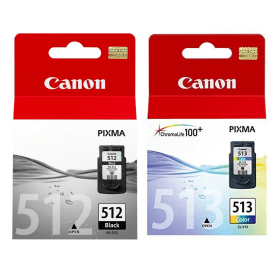
Black
Number in Pack: 1
Volume of Ink: 15ml each
MPN: 2969B001AA
Colour
Number in Pack: 1
Volume of Ink: 13ml each
MPN: 2971B001AA

Black
Number in Pack: 1
Volume of Ink: 9ml each
MPN: 2970B001AA
Colour
Number in Pack: 1
Volume of Ink: 9ml each
MPN: 2972B001AA

Black
Number in Pack: 1
Volume of Ink: 16.5ml each, 10% extra ink vs the OEM option
MPN: 2969B001AA

Black
Number in Pack: 1
Volume of Ink: 15ml each
MPN: 2969B001AA

Black
Number in Pack: 1
Volume of Ink: 9ml each
MPN: 2970B001AA

Colour
Number in Pack: 1
Volume of Ink: 15ml each, 15% extra ink vs the OEM option
MPN: 2971B001AA

Colour
Number in Pack: 1
Volume of Ink: 13ml each
MPN: 2971B001AA

Colour
Number in Pack: 1
Volume of Ink: 9ml each
MPN: 2972B001AA
What the Canon Pixma MP270 can offer users is high quality printing combined with scanning and copying making it the machine of choice for many households, students and first-time printer buyers.
Photography enthusiasts will appreciate the versatility of a printer that can allow direct printing from a camera. By using the PictBridge feature included with this device, users will be able to print without the need for a PC and instead print directly from compatible cameras, smartphones or even camcorders.
The photo printing functionality of the Canon Pixma MP270 is helped by Canon’s FINE technology. This will provide a print resolution of 4800 x 1200dpi making photo prints appear both vivid and detailed. Quality photo printing doesn’t necessarily need to be a slow process. The MP270 will produce a 10 x 15cm borderless photo in around 45 seconds.
Print and copy speeds for this machine are 8.4ipm for monochrome and 4.8ipm for colour. In terms of the quality of scanning offered, a 1200dpi scanner will produce detailed scans whilst Auto Scan Mode is capable of detecting whether a photo or document is being scanned and will adjust the scanner settings as a result.
In-keeping with the build quality often seen in the Pixma series of printers, this device has a compact and stylish appearance that can easily be accommodated on a desktop. There is also the added convenience of a self-opening paper tray that will open to collect prints and copies automatically.
Amongst the other features included with the Canon Pixma MP270 is sophisticated Scene Analysis and Face Detection technology. This helps to eliminate the appearance of red eye and can optimise the exposure levels of certain parts of an image to give the user the best results possible.
The Canon Pixma MP270 Multifunction Printer is a compact all-in-one printer that offers photo-lab quality printing.
The MP270 prints, makes copies, scans and can print from cameras or smartphones via PictBridge. PictBridge lets users print directly from a digital camera or other wireless photo devices without even turning on the PC. The printer prints at a resolution of 4800 by 1200dpi, while it can print a 10 by 15cm borderless photo in about 45 seconds. It does this using Canon’s FINE Print system that utilises a hybrid ink system for vivid colours.
The Auto Photo Fix II technology will automatically remove red eye and correct multi-zone exposures. A number of other pieces of software, including Canon’s Easy-PhotoPrint, let users quickly touch up their digital prints, share these online, and more.
The scanner on the MP270 scans at a depth of 1200dpi and features the Auto Scan Mode. This detects the size of the original and scans only the document itself. It then saves the image with the correct settings for that document type, all without any prompting from the user. The copy feature reduces or enlarges photos as needed.
Pros
Cons
Star Rating: 3.5


 FREE Delivery over £35
 Unbeatable Prices



