Looking for replacement ink bottles for the Canon Pixma G6050? Our low price products have been sourced by industry experts and will help get the most out of your printer.
Read our expert review of the Canon G6050 below to find out more about the features this machine offers for users at home or at work.


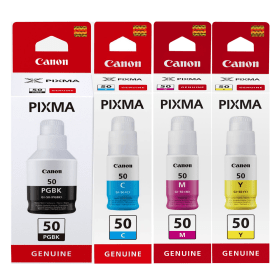
Black
Number in Pack: 1
Volume of Ink: 170ml each
MPN: 3386C001
Cyan
Number in Pack: 1
Volume of Ink: 70ml each
MPN: 3403C001
Magenta
Number in Pack: 1
Volume of Ink: 70ml each
MPN: 3404C001
Yellow
Number in Pack: 1
Volume of Ink: 70ml each
MPN: 3405C001
Black
Number in Pack: 1
Volume of Ink: 170ml each
MPN: 3386C001
Cyan
Number in Pack: 1
Volume of Ink: 70ml each
MPN: 3403C001
Magenta
Number in Pack: 1
Volume of Ink: 70ml each
MPN: 3404C001
Yellow
Number in Pack: 1
Volume of Ink: 70ml each
MPN: 3405C001

Black
Number in Pack: 1
Volume of Ink: 170ml each
MPN: 3386C001

Black
Number in Pack: 1
Volume of Ink: 170ml each
MPN: 3386C001

Cyan
Number in Pack: 1
Volume of Ink: 70ml each
MPN: 3403C001

Cyan
Number in Pack: 1
Volume of Ink: 70ml each
MPN: 3403C001

Magenta
Number in Pack: 1
Volume of Ink: 70ml each
MPN: 3404C001

Magenta
Number in Pack: 1
Volume of Ink: 70ml each
MPN: 3404C001

Yellow
Number in Pack: 1
Volume of Ink: 70ml each
MPN: 3405C001

Yellow
Number in Pack: 1
Volume of Ink: 70ml each
MPN: 3405C001
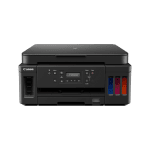
The Canon Pixma G6050 is able to print, scan and copy and utilises a refillable ink-tank system that can help to produce crisp text and vibrant colour graphics.
This print quality can help you to produce documents and even photo prints that can be shared with colleagues and clients. A 4800 x 1200dpi print resolution will help the consistency of performance further and you can carry out relatively high volume printing thanks to a 350-sheet (plain) paper capacity.
If you're using the Canon Pixma G6050 in a busy office, you can take advantage of the Manage Information Base feature to remotely monitor both the ink levels and the status of your print jobs.
For those looking to use this machine in a home office, you'll be pleased to know that it's a compact model and possesses a two-line LCD on a tiltable front panel for added usability. It’s worth noting that this printer will operate at speeds of up to 13ipm for mono and 6.8ipm for colour.
In terms of the connectivity options available, the Canon Pixma G6050 can be accessed via the Canon PRINT app (and PIXMA Cloud Link) or through an Ethernet connection. Additionally, you can print from a smartphone device through Mopria, AirPrint and Windows 10 Mobile.
All of the Canon G6050 ink bottles listed on this page have been thoroughly tested so you can print with peace of mind. We also go the extra mile by backing all of the products we sell with a 100% Satisfaction Guarantee.
As the G6050 utilises an individual ink-tank system you can simply replace the colour you've used or opt to make a bulk purchase through one of our multipack offers.


 FREE Delivery over £35
 Unbeatable Prices



