

Compatible Own Brand
Black
Number in Pack: 1
Volume of Ink: 16.5ml each, 10% extra ink vs the OEM option
MPN: 2969B001AA
Colour
Number in Pack: 1
Volume of Ink: 15ml each, 15% extra ink vs the OEM option
MPN: 2971B001AA
We advise you to choose this multipack over the Canon branded multipack for the best value.
Available for Next Day Delivery
Available for Next Day Delivery
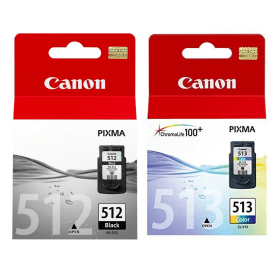
Black
Number in Pack: 1
Volume of Ink: 15ml each
MPN: 2969B001AA
Colour
Number in Pack: 1
Volume of Ink: 13ml each
MPN: 2971B001AA
We advise you to choose the Cartridge People branded multipack over this multipack!
View Recommended ProductAvailable for Next Day Delivery
Available for Next Day Delivery

Black
Number in Pack: 1
Volume of Ink: 9ml each
MPN: 2970B001AA
Colour
Number in Pack: 1
Volume of Ink: 9ml each
MPN: 2972B001AA
We advise you to choose the Cartridge People branded multipack over this multipack!
View Recommended ProductAvailable for Next Day Delivery
Available for Next Day Delivery

Compatible Own Brand
Black
Number in Pack: 1
Volume of Ink: 16.5ml each, 10% extra ink vs the OEM option
MPN: 2969B001AA
We advise you to choose this product over the Canon branded product for the best value.
Available for Next Day Delivery
Available for Next Day Delivery

Black
Number in Pack: 1
Volume of Ink: 15ml each
MPN: 2969B001AA
We advise you to choose the Cartridge People branded product over this product!
View Recommended ProductAvailable for Next Day Delivery
Available for Next Day Delivery

Black
Number in Pack: 1
Volume of Ink: 9ml each
MPN: 2970B001AA
We advise you to choose the Cartridge People branded product over this product!
View Recommended ProductAvailable for Next Day Delivery
Available for Next Day Delivery

Compatible Own Brand
Colour
Number in Pack: 1
Volume of Ink: 15ml each, 15% extra ink vs the OEM option
MPN: 2971B001AA
We advise you to choose this product over the Canon branded product for the best value.
Available for Next Day Delivery
Available for Next Day Delivery

Colour
Number in Pack: 1
Volume of Ink: 13ml each
MPN: 2971B001AA
We advise you to choose the Cartridge People branded product over this product!
View Recommended ProductAvailable for Next Day Delivery
Available for Next Day Delivery

Colour
Number in Pack: 1
Volume of Ink: 9ml each
MPN: 2972B001AA
We advise you to choose the Cartridge People branded product over this product!
View Recommended ProductAvailable for Next Day Delivery
Available for Next Day Delivery
Available for Next Day Delivery
Available for Next Day Delivery
Available for Next Day Delivery
Available for Next Day Delivery
Available for Next Day Delivery
To ensure you receive an answer to your question in the quickest time possible, we recommend you contact our customer service team directly using one of the following methods:
If you have a product-related question benefiting all customers, please proceed. Your question and our response may be published on cartridgepeople.com after approval.
Asked by Canon pixma mp499 - Published over 3 years ago
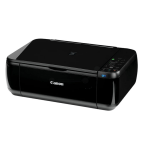
For everyday use, the Canon Pixma MP499 gives the kind of versatility and affordability that will be appreciated by fans of lab-quality photo prints.
Thanks to built-in Wi-Fi, this all-in-one offers printing, scanning and copying to home users from wherever they are in the home. There’s software to increase the functionality of this device with Easy-WebPrint EX allowing users to clip and combine information from various web pages to be printed on a single page.
In order to optimise photo prints, the Auto Photo Fix II feature will make corrections such as removing red eye so you can enjoy outstanding quality prints.
The machine will be ready to print quickly as a result of the Quick Start function. Operation is further helped by the printer being able to automatically open the paper tray.
Memories can be captured from Canon digital camera movies through using Canon’s Full HD Movie Print. Using this software, it’s possible to capture a frame to print so you can grab a memory from your favourite home movie.
Similar in many ways to the MP450, the Canon Pixma MP499 offers a cheaper alternative that misses some functionality but still has enough to deliver good quality text and photo prints.
Versatility is assured as a result of the printer’s ability to print wirelessly although there is no Ethernet connectivity available or memory card slots. The machine is compact but lacks a touch screen which is a feature found on the more expensive MP450.
Speed of printing is good when using the M499 with 8.8ipm for mono and 5ipm for colour offered whilst a lab-quality photo print (10 x 15cm) will be produced in just 41 seconds.
Scanning is boosted by a 1200dpi scan resolution and there is technology available in the shape of Auto Document Fix that’ll enhance text, images and graphics in scanned documents.
As a “first family printer”, the MP499 ticks a lot of boxes and can perform a number of tasks effectively. However, for those who require a little more style and substance from their device, it’s probably better to look towards the MP450, even if that means spending a little more.
Pros
Cons
Star Rating: 4


 FREE Delivery over £35
 Unbeatable Prices