What the Canon Pixma MP495 can give users is a versatile printer at an affordable price.
That affordability doesn’t mean that this machine has any less of the style you have come to expect from Canon Pixma printers. Everyday users should expect to enjoy photo-lab quality prints, produced by a machine that utilises the high standard of ink cartridges available from Cartridge People at exceptional prices.


Compatible Own Brand
Black
Number in Pack: 1
Volume of Ink: 16.5ml each, 10% extra ink vs the OEM option
MPN: 2969B001AA
Colour
Number in Pack: 1
Volume of Ink: 15ml each, 15% extra ink vs the OEM option
MPN: 2971B001AA
We advise you to choose this multipack over the Canon branded multipack for the best value.
Available for Next Day Delivery
Available for Next Day Delivery
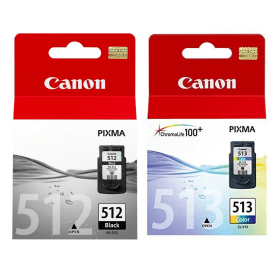
Black
Number in Pack: 1
Volume of Ink: 15ml each
MPN: 2969B001AA
Colour
Number in Pack: 1
Volume of Ink: 13ml each
MPN: 2971B001AA
We advise you to choose the Cartridge People branded multipack over this multipack!
View Recommended ProductAvailable for Next Day Delivery
Available for Next Day Delivery

Black
Number in Pack: 1
Volume of Ink: 9ml each
MPN: 2970B001AA
Colour
Number in Pack: 1
Volume of Ink: 9ml each
MPN: 2972B001AA
We advise you to choose the Cartridge People branded multipack over this multipack!
View Recommended ProductAvailable for Next Day Delivery
Available for Next Day Delivery

Compatible Own Brand
Black
Number in Pack: 1
Volume of Ink: 16.5ml each, 10% extra ink vs the OEM option
MPN: 2969B001AA
We advise you to choose this product over the Canon branded product for the best value.
Available for Next Day Delivery
Available for Next Day Delivery

Black
Number in Pack: 1
Volume of Ink: 15ml each
MPN: 2969B001AA
We advise you to choose the Cartridge People branded product over this product!
View Recommended ProductAvailable for Next Day Delivery
Available for Next Day Delivery

Black
Number in Pack: 1
Volume of Ink: 9ml each
MPN: 2970B001AA
We advise you to choose the Cartridge People branded product over this product!
View Recommended ProductAvailable for Next Day Delivery
Available for Next Day Delivery

Compatible Own Brand
Colour
Number in Pack: 1
Volume of Ink: 15ml each, 15% extra ink vs the OEM option
MPN: 2971B001AA
We advise you to choose this product over the Canon branded product for the best value.
Available for Next Day Delivery
Available for Next Day Delivery

Colour
Number in Pack: 1
Volume of Ink: 13ml each
MPN: 2971B001AA
We advise you to choose the Cartridge People branded product over this product!
View Recommended ProductAvailable for Next Day Delivery
Available for Next Day Delivery

Colour
Number in Pack: 1
Volume of Ink: 9ml each
MPN: 2972B001AA
We advise you to choose the Cartridge People branded product over this product!
View Recommended ProductAvailable for Next Day Delivery
Available for Next Day Delivery
Available for Next Day Delivery
Available for Next Day Delivery
Available for Next Day Delivery
Available for Next Day Delivery
Available for Next Day Delivery
To ensure you receive an answer to your question in the quickest time possible, we recommend you contact our customer service team directly using one of the following methods:
If you have a product-related question benefiting all customers, please proceed. Your question and our response may be published on cartridgepeople.com after approval.
Asked by Anonymous - Published over 3 years ago
Whether you’re looking to enjoy exceptional quality photo printing or professional looking business documents, the Canon Pixma MP495 is capable of fulfilling your printing needs.
As a home all-in-one printer, the Pixma MP495 has built-in Wi-Fi connectivity meaning it can easily be shared by a number of users. Quality is assured thanks to a print resolution of up to 4800 x 1200dpi meaning that users can enjoy detailed photographs as well as documents that display clear text.
This standard of quality is supported by print speeds of 8.8ipm in mono and 5.0ipm in colour making this a machine that can provide prints at an impressive rate. Speed of use is assisted by the device’s Quick Start feature that will see the MP495 ready to print in a matter of seconds. Ease of use is helped by the Canon Solution Menu EX which even automatically opens the paper tray if you forget to do so, allowing you to retrieve your prints with ease.
When it comes to scanning, a 1200dpi will produce results in high detail whilst the machine’s Auto Scan Mode will automatically determine whether a photograph or document is being scanned. From there, it will then use the most appropriate settings to carry out the scanning. Text, graphics and images will be enhanced thanks to Auto Document Fix technology.
Where this particular Pixma printer stands out is in its ability to print using Canon Full Movie HD Print. This function will take your Canon digital camera moments and turn them into high quality prints even though they are from a movie.
There is a suite of software available for users to make the most of their photo prints with Easy-WebPrint EX letting you clip and combine information from various web pages, so you don’t have to print unnecessarily.
Ensuring your photo prints are long-lasting is made possible thanks to the ChromaLife100+ system involved in the genuine Canon inks that are compatible with this machine.
The Canon Pixma MP495 All-in-One Wi-Fi Colour Photo Printer is a photo lab quality home printer designed for use by amateur photographers, graphic designers and small businesses.
The printer prints documents up to 8.8 images per minute in monochrome and photos in full colour at speeds of up to 5 pages per minute. It can create a photo lab quality 10 by 15cm borderless photo in under 45 seconds. These photos can be printed in up to 4800 by 1200dpi resolution and on a large variety of different media sizes, including envelopes and legal size paper.
Users can also print directly from compatible memory cards without going through the computer. An LCD screen allows for some basic photo manipulation, including resizing photos, directly on the printer. Software allows users to print images straight from digital movies via the Canon Full HD Movie Print programme.
The MP495 comes Wi-Fi enabled, allowing users to print from or scan to a wide variety of wireless devices, including smartphones and tablets. It can also be connected to a computer via a USB cable.
The scanner can scan photos up to 1200dpi, and autoscan mode recognises the type of document being scanned and selects the best settings for it, allowing users to scan with one touch of a button.
Pros
Cons
Star Rating: 4


 FREE Delivery over £35
 Unbeatable Prices