

Compatible Own Brand
Black
Number in Pack: 1
Volume of Ink: 16.5ml each, 10% extra ink vs the OEM option
MPN: 2969B001AA
Colour
Number in Pack: 1
Volume of Ink: 15ml each, 15% extra ink vs the OEM option
MPN: 2971B001AA
We advise you to choose this multipack over the Canon branded multipack for the best value.
Available for Next Day Delivery
Available for Next Day Delivery
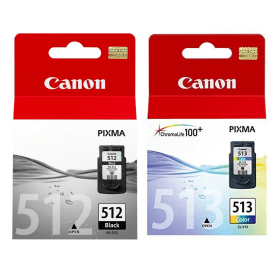
Black
Number in Pack: 1
Volume of Ink: 15ml each
MPN: 2969B001AA
Colour
Number in Pack: 1
Volume of Ink: 13ml each
MPN: 2971B001AA
We advise you to choose the Cartridge People branded multipack over this multipack!
View Recommended ProductAvailable for Next Day Delivery
Available for Next Day Delivery

Black
Number in Pack: 1
Volume of Ink: 9ml each
MPN: 2970B001AA
Colour
Number in Pack: 1
Volume of Ink: 9ml each
MPN: 2972B001AA
We advise you to choose the Cartridge People branded multipack over this multipack!
View Recommended ProductAvailable for Next Day Delivery
Available for Next Day Delivery

Compatible Own Brand
Black
Number in Pack: 1
Volume of Ink: 16.5ml each, 10% extra ink vs the OEM option
MPN: 2969B001AA
We advise you to choose this product over the Canon branded product for the best value.
Available for Next Day Delivery
Available for Next Day Delivery

Black
Number in Pack: 1
Volume of Ink: 15ml each
MPN: 2969B001AA
We advise you to choose the Cartridge People branded product over this product!
View Recommended ProductAvailable for Next Day Delivery
Available for Next Day Delivery

Black
Number in Pack: 1
Volume of Ink: 9ml each
MPN: 2970B001AA
We advise you to choose the Cartridge People branded product over this product!
View Recommended ProductAvailable for Next Day Delivery
Available for Next Day Delivery

Compatible Own Brand
Colour
Number in Pack: 1
Volume of Ink: 15ml each, 15% extra ink vs the OEM option
MPN: 2971B001AA
We advise you to choose this product over the Canon branded product for the best value.
Available for Next Day Delivery
Available for Next Day Delivery

Colour
Number in Pack: 1
Volume of Ink: 13ml each
MPN: 2971B001AA
We advise you to choose the Cartridge People branded product over this product!
View Recommended ProductAvailable for Next Day Delivery
Available for Next Day Delivery

Colour
Number in Pack: 1
Volume of Ink: 9ml each
MPN: 2972B001AA
We advise you to choose the Cartridge People branded product over this product!
View Recommended ProductAvailable for Next Day Delivery
Available for Next Day Delivery
Available for Next Day Delivery
Available for Next Day Delivery
Available for Next Day Delivery
Available for Next Day Delivery
Available for Next Day Delivery
To ensure you receive an answer to your question in the quickest time possible, we recommend you contact our customer service team directly using one of the following methods:
If you have a product-related question benefiting all customers, please proceed. Your question and our response may be published on cartridgepeople.com after approval.
Asked by William Fisher - Published over 3 years ago
Asked by William Fisher - Published over 3 years ago
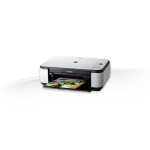
PictBridge, Easy-WebPrint EX and Auto Scan Mode are just three of the features included with the Canon Pixma MP272.
Providing affordability and versatility to your home printing, this machine can easily print, scan and copy to a high standard. Whether you’re a first-time printer user, university student or someone looking for a family printer; this machine is ideal.
A print resolution of 4800 x 1200dpi is offered by a model that can help photos appear both detailed and free from grain. Text will appear crisp and sharp thanks to an additional pigment black ink. Combining quality and speed, the MP272 will produce a 10 x 15cm borderless photograph in around 45 seconds.
The Auto Scan Mode is able to automatically sense whether a photo or document is being scanned and then save it using the most appropriate settings.
Photos can be printed directly from a compatible digital camera as a result of the PictBridge connection.
The Pixma range offers home users a stylish and compact machine to carry out a range of printing tasks easily and the MP272 is no different.
A rear-loading paper tray can hold 100 sheets which should suit the demands of the printer user wanting to print with a medium degree of frequency. There is also the added convenience of the paper tray being self-opening, automatically opening to collect your copies and prints.
Another piece of software which will be welcomed by photo printing enthusiasts is Auto Photo Fix II which can correct a wide range of common faults including underexposure.
There’s no wireless connectivity available with the MP272 so the closest you’ll get to printing without the need for a computer is by using PictBridge support and a compatible cable. That lack of wireless printing means that this is unlikely to be the obvious choice for a busy home environment but results are still good enough to satisfy students.
An important consideration will be the purchase price which should represent value for money considering the scanning and copying options from what is a relatively low priced printer.
Pros
Cons
Star Rating: 3.5


 FREE Delivery over £35
 Unbeatable Prices